CoherenSynth app icon
CoherenSynth Pure Sine Wave Instrument

Tune the frequency of the space.

A pure sine wave, multi-touch, free-tuned instrument for meditation, healing and musical exploration.

App Store QR code to download CoherenSynth on the App Store Scan to download Download on the App Store Available for

iPad and iPhone
Pure sine waves Multi-touch 3 looper decks Free tuning Scales Live sampling Ableton Link
Film 01 Overview

CoherenSynth in motion.

Play the energy of the space — You define the tuning
From free tuning to fixed

Create, experiment, and experience sound in a way you haven't before.

Pull tones together with your fingers and hear them meet. Try a variation, slide it somewhere else, and when something lands — sample it and play it back across the keys. It all happens on one surface: nothing buried, nothing more than a tap away.

Explore the instrument

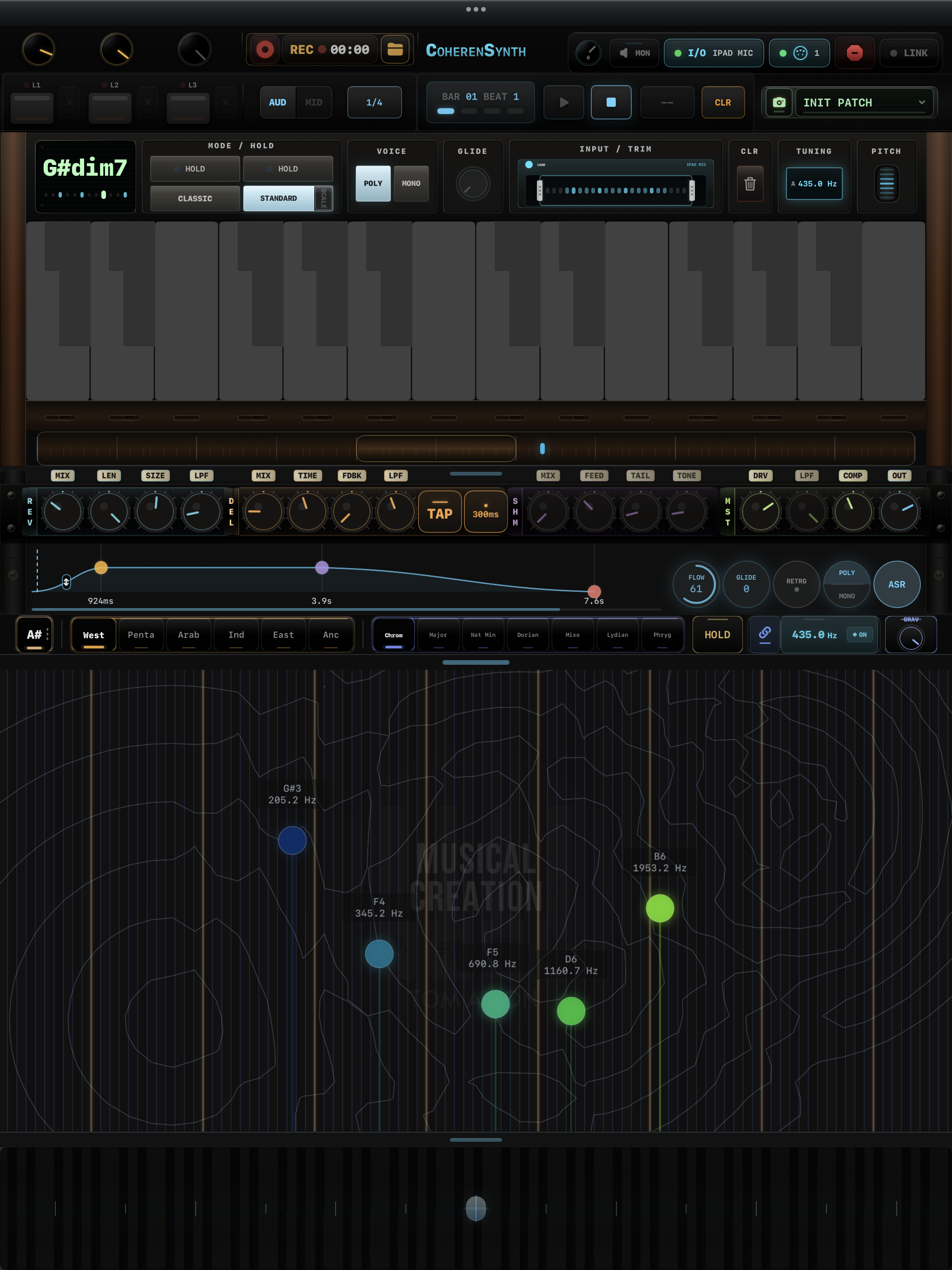
The complete CoherenSynth interface with recorder, loop decks, chord display, multi-touch keyboard, effects, envelope, scale controls, sound canvas and touch strip
Session recordingRecord and share complete sessions
Live monitoringSing or speak through the effects
Loop decksLayer three synchronized loops
Chord readoutIdentifies chords as you play
Multi-touch keysSlide up for volume
Sideways for pitch
Effects chainReverb, delay and shimmer
Scales & modesStay in key while you explore
Touch stripPinch to zoom
Drag to bend
Ableton LinkSync with other music apps
Free tuningAutomatically identifies your tuning
Octave barMove quickly between octaves
EnvelopeShape attack, decay, sustain and release
Sound canvasBlend tones directly with your fingers
Workflow
Detailed controls
Three loop decks labelled L1, L2 and L3
Loop decks Three decks, armed and always in view
Sampler mode and voice controls — Classic, Standard, Poly, Mono
Sampler & voice Classic or Standard engine · poly or mono
Effects chain — reverb, delay, shimmer and master knobs
Effects Reverb, ping delay, shimmer, master chain — all on one row
Envelope editor with draggable curve points
Envelope Drag a point — the waveform is the editor
Record transport with REC button, timer and take folder
Session recorder Capture the whole session, then AirDrop or share it from the folder
Input and trim panel showing the recorded waveform with trim handles
Live sampling Tap to record your voice, trim it, then drag it onto the keys and play it across pitches
Top bar monitor controls — level knob, MON button and iPad mic input selector
Live monitor Open the mic straight into the effects chain — sing or talk through the reverb and delay, with its own level
§ 02 — The canvas

Position is the sound.

The full audible range with no frets and no steps. Set a node down with your finger and it sounds exactly where it sits — move it anywhere, travel between frequencies, stack as many as you like and build whole soundscapes.
CoherenSynth sound canvas with labelled note nodes across a contour field
Sound canvas Set a node with your finger, then travel — every one reads its own frequency
Touch bend strip running the width of the instrument
Touch bend strip Hold notes and move them together — bend a whole cluster under one finger
Scale, mode and tuning controls with the gravity knob
Scales & gravity And when you want the guide rails: gravity pulls every node toward the scale you picked
§ 03 — Inside

An instrument, sampler & looper in one.

Six core ideas, every one of them designed to disappear under your fingers. No menus, no presets to chase — just a surface that listens back.
F · 01

Pure sine wave

One tone, infinitely clean. The simplest, most coherent waveform in nature — and the foundation of every sound you'll build.

F = sin(2πft)
F · 02

Multi-touch, free tuned

Ten fingers, ten voices — no frets, no fixed grid. Slide between pitches like a string, or settle into the scale you've chosen.

Up to 10 simultaneous voices
F · 03

Two sampler modes

Classic trims and tunes any clip across the keys. Standard stretches it sample-faithful. Drop a voice memo. Play it as a chord.

Classic / Standard
F · 04

3-deck looper

Stack three independent loops, each in audio or MIDI. Built around bars, not seconds — so layers always lock into the same breath.

L1 · L2 · L3 — bar-quantized
F · 05

Wave sample

Every note draws itself. Watch the envelope breathe in real time and shape attack, length and decay by touching the curve.

Live waveform editor
F · 06

Adaptive scale gravity

Notes drift naturally toward the scale you've chosen — gentle when you want freedom, decisive when you want lock. Set the pull with one knob.

GRAV — 0 to 100%
Plays in time with your studio
Ableton Link Tempo & phase · locked
Loopy Pro Quick navigation

Start a take here and it falls into step with the whole session — Ableton Live, Loopy Pro, and any Link-enabled app on the network. No cables, no MIDI clock.

§ 04 — Two ways to play

A player's instrument. A producer's tool.

Switch contexts in a tap. The keys, the layout, even gravity follow you across modes.
Mode 01 — Live

Tune in. Improvise.

The space around you becomes your reference. Drop the gravity to zero, slide between pitches, and let the surface meet whatever frequency is already in the air.

Mode 02 — Sampler

Sample anything. Play it back.

A breath, a sentence, a cup hitting a table. Drop it into the sampler, pick Classic or Standard, and suddenly that sound is an instrument — chromatic, polyphonic, yours.

CoherenSynth

Tune in. Play the space.

CoherenSynth is available on the App Store for iPad and iPhone. Headphones recommended. Quiet spaces encouraged.

QR code to download CoherenSynth on the App Store

Scan with your camera, or download directly on this device.

Download on the App Store Manual coming soon